NYX Ditech

Categories
Blog

Top 5 UX Trends Prediction For 2019

The web design world is highly dynamic and fast-paced, especially the UX. With every new year, comes new ux trends and techniques which drive the designing industry. 2018 was all about data-driven UX, accompanied by the rise of the UX researcher role. Privacy by design was also talked about a lot in light of the GDPR. In addition, a new concept popped up – DesignOps. What will be driving the UX industry this year? Whether it will be DesignOps or something else? Here are a few predictions from us for the UX trends in 2019:

1. Businesses Will Be Driven By UX

It’s a known fact now that UX is a major driving force for any kind of business, and this will continue to be a central topic in 2019 as well. In recent years, a lot of studies have been conducted to measure the business value of a good design. It’s crucial to realise the importance of UX and to incorporate it on a strategic level. As we move into 2019 and beyond, designers will start to develop more empathy for businesses and not just for users. In the coming years, a lot of designers will aim to make data-driven decisions, to measure the effectiveness of their designs, and to optimize their processes in a way that makes sense for business. Prototyping, testing and customer research are pivotal tools in starting new business ventures. UX designers will become a valuable resource for entrepreneurs.

2. Storytelling Will Be More Important

From a consumer perspective, good UX is no longer considered a unique selling point. From being ‘good to have’, it has now become a ‘must have’. In today’s world, if a product or service provides a below-par user experience, the user will discard and replace it in no time. Designers will have to focus on creating a truly memorable user experience rather than just decent user experience. As brands seek new and innovative ways to differentiate, we’ll see a growing trend towards storytelling in UX. Scientific research has shown that, as humans, we get fascinated by stories. When we hear a story, the neural activity in the brain increases up to five times, meaning that we are much more likely to remember the story and the message it’s trying to convey.

The same goes for products and services. It’s no longer enough to simply signpost a user throughout your product; more and more brands (and UX designers) will need to tell a memorable story. In 2019, UX designers will use storytelling to translate user value into reality, creating products and experiences that consumers relate to on a deeper level. Learning how to incorporate storytelling into the design process will be one of the biggest areas of opportunity for UXers next year.

3. More and More UX Writers

2018 was about the rise of UX researchers and this year too we will see an increase in the popularity of specialist job titles. One particular role that’s earning plenty of attention is that of the UX writer. Giants like Google, Amazon and YouTube already have identified the need and importance of UX writers, and have got them into their design teams. Try searching UX writer on any of the popular job portals; the number of results will amaze you.

There are several reasons why the demand for UX writers continues to grow. As mentioned above, brands are seeking new ways to stand out; looking for ways to fine-tune the user experience as thoroughly as possible. In doing so, they are realizing that copy is as crucial to the overall design of the product as wireframes, prototypes, and UI elements. Be it a CTA on a button or the message that pops up when a user makes a purchase. The voice or tone of a user interface is just as influential as the colors, typography, and information architecture. So, it makes sense that writers and designers work closely together.

4. Voice-Driven Interfaces Will Be a Hit

Voice continues to be a talking point, with rapid growth on the horizon for 2019. Deloitte Global predicts that the smart speaker industry will be worth US$7 billion in 2019, signalling a 63 per cent growth rate from 2018, and making smart speakers the fastest-growing connected device category worldwide in 2019. At the moment, people are mainly using their Alexa and Google Home devices to play music, check the weather and perform some basic tasks. However, if the market grows continually and has a truly valuable impact on people’s lives, voice-first devices need to become more useful beyond these basic functions. That said, the industry will now need designers who can create useful, user-friendly voice applications; designers who can take the voice experience from average to fabulous.

5. The Latest Term: Device-agnostic

Along with DesignOps, there’s a new buzzword that’s trending, and will be ruling the charts in 2019: device-agnostics. The modern-day answer to responsive design, the device-agnostic design is taking seamless user experience to a whole new level. With the rise of wearables and voice assistants, it’s no longer enough to simply cater to mobile and desktop. The UX mindset is shifting, and in 2019 and beyond, designers will think in terms of the user journey as a whole, not just in terms of the devices being used. Device-agnostic design creates a continuous user journey that can pass through different touchpoints; be it a smartphone, a laptop, or a smart speaker. The device-agnostic design is dynamic and adaptable. It lets you complete your user journey in the most convenient way possible.

Much like storytelling, brands who focus on holistic user journeys rather than devices will set themselves apart in 2019. Therefore, designers will need to adapt their approach in line with the direction the industry is taking. On the whole, 2019 looks set to be another exciting year for UX. You can speak to one of our UX experts to learn more.

Categories
Web Design

The Importance Of Web Design In Marketing Campaigns

A company’s website is its primary introduction to the world of web, and it needs to be as effective as possible to create a stunning first impression. Even the best marketing campaigns could miserably fail if they go along with a poorly designed website. The marketing strategy of your company may be convincing enough to grab the attention of prospective clients, but it is your website that will lead them to make the final purchase thus providing you with some real ROI. In this article, we will help you understand the importance of high-quality web design and will educate you about how it can accentuate the success of your marketing efforts.

Direct Impact on SEO

What’s the point of marketing yourself, if users can’t find you. A lot of businesses opt for website redesign these days because their current designs simply do not help their Google rankings. The first step is usually eliminating duplicate content occurrences which is the easy part. Additionally, it is important that your website design contains options for inputting meta descriptions, Alt tags etc., considering that these are some of the simple, yet important, elements of SEO.

Main Source of Conversions

The foremost aim of any business is to increase its business, which is generally done by increasing conversions. The goal of marketing efforts and even the website is to generate new and recurring business. The conversion rate is calculated by the number of website visitors who complete the desired action – purchase, register, subscribe etc. Designers can design website that boosts conversion ratio by improving the layout, text, and online forms. It is important for a business to accurately convey its goals to the people designing its website, so that they can act accordingly. These web development experts can provide you with not only a great looking website, but also one that is effective, in terms of improving your overall conversions.

Improves the User Experience

User experience, or UX, is a very important factor that needs to be taken into consideration when we talk about website design and its effect on a marketing campaign. For example, you can create high-quality content and place it on your site, and then use different channels to advertise it. However, if your website is not user-friendly, the efforts will be pointless because all the people you have attracted using marketing tools won’t stick to your website long enough to check out your content and your product.

Other important UX features include website speed, navigation and visual elements. It’s not good if your website takes too long to load. A new user is almost guaranteed to leave before even giving your website a chance. According to a survey, nearly half of web users expect a site to load in two seconds or less. They tend to abandon a site that isn’t loaded within three seconds. So there is very little room for error.

The next feature that has a great impact on UX is navigation. Make sure you simplify it. Easy navigation ensures longer stay on the website and there is a bigger likelihood of conversion. The visual elements that make up your website also play a vital role in elevating the UX of your website. They need to be designed in such a way so as to provoke emotions in your users.

Helps to Reinforce Your Company’s Message

Your website design is important for elevating your brand awareness and conveying your company’s goals. Besides successfully conveying your company’s message, it also helps in evoking emotions in your users. Some carefully chosen images in combination with the right colour choices in the background can have a huge impact.

Website design can play a lot of different roles in a marketing campaign. The design can be there as a support system for reinforcing the desired message. Even be the epicentre around which the whole campaign is built. It is a powerful tool that can both educate new users and drive them to make a purchase.

A well-designed website leads to a successful marketing campaign. Efforts and funds you invest in a marketing strategy can be a waste if you don’t have the right design. Discuss your website requirements with our team of experts.

Categories
Blog

Top-Notch Tips for Creating a Time-Saving Design

Users over the Internet have a very short attention span. They don’t really read everything and stick on every page, but scan through quickly. This makes it important to use design techniques that help users scan and get most of the information from your website in the shortest time possible.

It is critical to understand what users need to learn from the design at a glance and help them get that information so that they’ll stick around and explore your website. Here are a few tips to do so.

Minimal Thinking

A design without a lot of choices can be quick and easy for the user. While at first, “think minimally” might make you think about a minimal design style, it’s more about streamlining elements and effects. Overall, the goal is to limit information overload and the number of decisions a user has to make to meet the goal of the design. Keep simple navigation with a handful of choices, using simple typefaces that are easy to read at a glance.
Amp up the contrast between elements so that calls to action are easy to find. For every page, or scroll, in the design, stick to a single thought or action.

Use Visual Content to Encourage Actions

Strong visuals, including photography and videos, are an easy way to grab user attention and when paired with an actionable element, it can help generate an immediate click. It should be quick to move from one point to another within the design. Think about it in terms of e-commerce. A user sees a bag on social media, clicks to get to the website, where they must be able to see the item to keep interacting with the website.

A time-saving design would show the bag with a ‘Buy Now’ button. The user should easily understand how to get it or what is the next action, without having to fumble through multiple pages or clicks. Also, it’s a good practice to use the same image for off-site and on-site promotions. A different picture might not register as quickly with the user as the same image. This works because most people can process an image more quickly than reading words.

Divide Complicated Elements into Parts

Create a story so that you can break a complicated design into smaller, more digestible pieces. Smaller blocks and pieces of content are easier to understand quickly, thereby facilitating a users’ movement from one element to element. Try user interface elements such as “read more” links, card-style blocks and parallax scrolling animation to create engagement and break down complicated designs.

Cut Down Forms

One of the easiest ways to make the design quicker for users is to cut down on asking for not so important information. Forms must be simple and should only collect the essential information such as name and email address, and follow up later for forms designed to generate leads.

Use forms that validate data so users know if they’ve entered something wrong, so corrections are quick and easy. Minimize typing and use buttons or checkboxes in forms where applicable.

Use Bold and prominent CTAs

Make the design quick to use and easy to finish with a bold call to action design that users can’t miss. Bright colored, oversized elements can help users immediately see what they are supposed to do. Further, provide content within buttons that tells users exactly what to do and what will happen when they “click here.”

In order to be seen, a CTA should have plenty of contrast so that it doesn’t blend in with surrounding elements and draws attention to itself. (And don’t forget to make sure the CTA is easy to find on mobile screens as well.)

Review and Edit Multiple Times

Nothing saves users’ time, more than duly checking each and every element, multiple times before publication. Edit everything in the website design and then review it again. A time-Saving website design has written copy that’s easy to read and understand. This means that there are no spelling errors or typos, sentences use proper syntax, grammar, and sentence structure, with everything being organized in a logical manner.

Sometimes a good edit means bringing in a third party to read everything and ensure it makes sense to someone else. An extra set of fresh eyes can help you identify the hidden errors, or to analyse if the content is too complex, with too many jargons.

Consistency Is The Key

A consistent design includes repeated elements, actions, and interactions that work in the exact same way throughout the design. It simply means that a button should always look like a button, have the same color and font, same hover state and work in the exact same way no matter where the button leads the user. Repeat this idea for any element in the design that gets used multiple times, such as icons, the cart, forms, links and social media buttons. Be consistent with other elements also. Headlines, body text and images used should also follow a consistent style.

Conclusion

Whether you agree or don’t, users are looking to do things in a hurry on your website. They want to quickly finish tasks or meet their goals and move on to something else. The more your design saves users’ time, the more user-friendly your website will become. Talk to our experts to discuss how you can add to the UX of your website.

Categories
Technology

Tips To Design An Amazing Ecommerce Product Page

The most important element of any ecommerce website is its usability. The user journey, from product display to check out, is a long process and there are so many elements involved in it. Therefore, it becomes crucial to address the usability of every web page of your website. Product pages are very tricky to design. More often than not, designers lose out at the usability front while ensuring that the products are displayed as best as they can be. Here are a few tips to design a successful and appealing product page for your Ecommerce website.

1. Add an Alluring, Strong CTA Button

This is probably the most important part of any ecommerce product page. A page’s call-to-action button is the crucial element that draws interest and entices a user to take an action. On a product page, this should be your “add to cart” button. It’s the one thing that’ll get people moving through your funnel to actually convert, which is the primary goal of any ecommerce website.

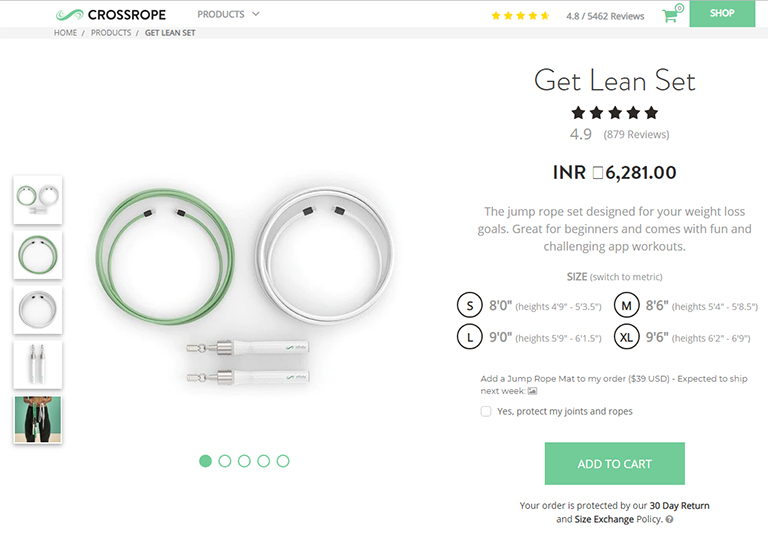
Take a look at the product page of Cross Rope. They feature a pretty simple design and the clear CTA button is colored bright green which immediately grabs attention and stands out against the background. That’s exactly the job of a “add to cart” button. For all CTAs, you ideally want to select a color that grabs attention and differentiates itself from everything else on that page. That said, its essential to blend the colour into your layout and make it feel natural.

crossrope

2. Price Must Be Easily Visible

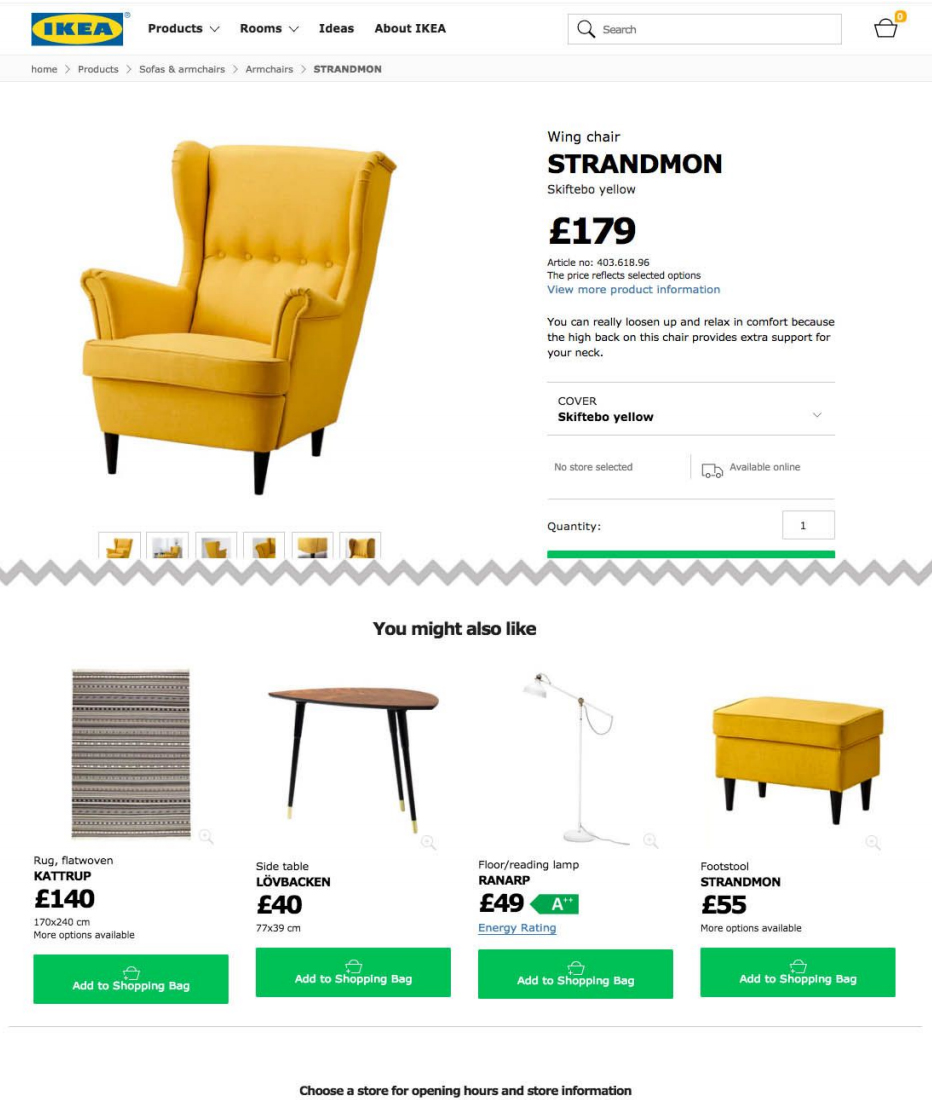
One of the biggest roadblocks to entry for most customers is the price of a product. No matter how much they like what you’re selling, but if it’s too pricey then it’s just not an option. Some designers think it makes sense to hide the price so users won’t notice. Well, that’s an awful idea. It is very obvious that at some point in time you will need to show the price to the customer and chances are more that he will not buy it. On the contrary, you want your price to be clearly visible and accessible at a glance. Give visitors the info right away so that they waste time looking at a product they can’t afford or just wouldn’t buy.

Take a look at the below image. You really don’t need big red text for your product pricing but it should be clearly visible at a glance. The best color and positioning for your site will depend on how your layout is structured.

3. KISS – Keep Information Short & Skimmable

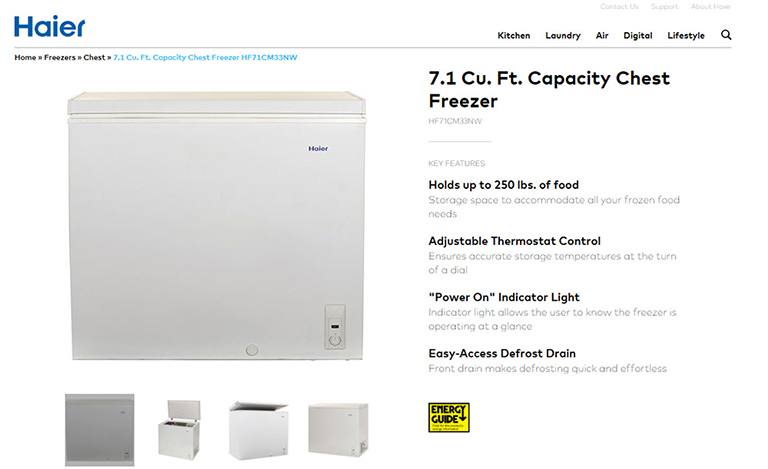
We often come across so many ecommerce websites with heavily detailed product pages because of which it becomes very stressful for users to read through the information. As a web designer, you should know that people don’t really read the entire content but they actually skim content and quickly look for what they need. Therefore it’s best to provide them with required information upfront, in the style they prefer. Crucial information on a webpage must be organized into page sections. It should be easily visible, easy to read, with clear language and very few obstructive page elements. Check out the Haier’s design. It has a list of features in bold text for the key points. These work like mini-headlines where the content is dark, bold and super easy to read. A great design choice that places attention on the consumer’s needs.

haier

4. User Reviews & Ratings

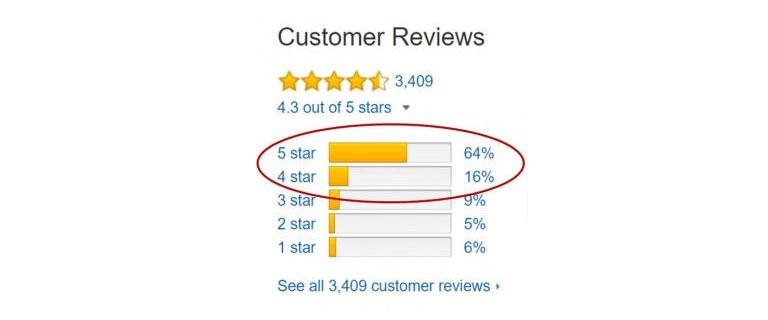
A product is easy to sell if it comes with a social approval stamp. Product reviews are incredibly valuable and most ecommerce platforms use this feature. You should highly encourage user reviews and push these towards the front of the product page whenever you can. Most ecommerce sites rely on a star-based rating system which works well. This gives a visual indicator of what most buyer’s think of the product. Visitors can quickly go through the star ratings and then see how many people have left used and reviewed a particular product. If you only see 2 or 3 reviews then you know the star rating isn’t really reliable. However, 30+ reviews mean that this is a good basis to gauge the product’s value. We can find this on plenty of ecommerce sites including Amazon, the king of modern Internet retail.

5. Clear Breadcrumb Trail

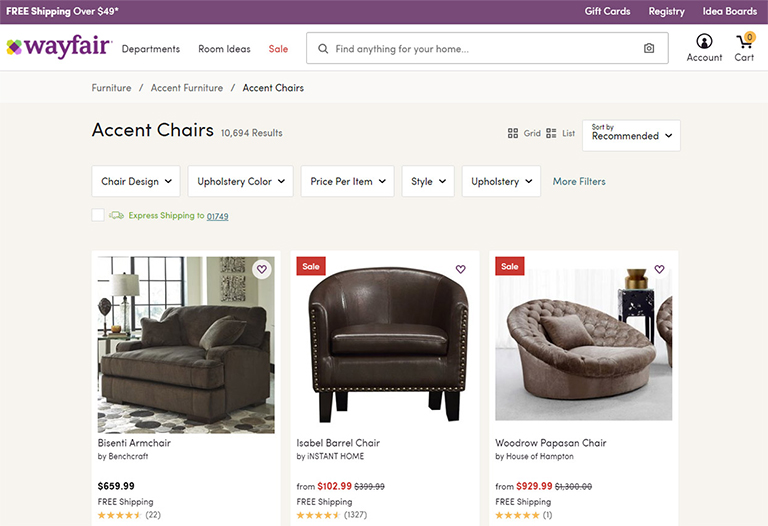
Another popular feature that many Ecommerce product pages have is breadcrumbs. You can add breadcrumbs to any page with ease and they don’t require a lot of space. In fact, they often take up empty space you never use. The benefit of a breadcrumb is the increased user engagement with relevant links to top-level parent categories for each product. Your goal should be to design similar breadcrumb-style navigation bars. But again, usability is key to everything and therefore your links should be easy to read and the breadcrumb categories should make sense.

wayfair


Categories
UX

5 UX Element Which Shined Throughout 2018

There’s no denying that user experience was big in 2017, and continued with the same pace in 2018 as well. Anticipating user expectations in future is tough and that’s why it’s a bit tricky to live up to user expectations. However, for designers, it’s important to at least be proactive to anticipate user expectations. The following 5 UX element have created a buzz throughout the year and can act as a guide for designing a satisfying and successful user experience in future.

1. Simplified Journey

There’s always some intention in a user’s mind when they interact with a website or mobile app; they want to achieve the intention as quickly as possible. To create a user-friendly application or website it is essential to simplify a user’s journey with time-saving designs. In simple terms, reduce the number of steps users have to take in order to achieve their goal. All the applicable information must be presented in an easy-to-use format and with a smooth navigational flow. Displaying only the most relevant information specific to the user context is instrumental in creating an optimal user experience.

2. Personalized Experience

Personalization is a technique embedded within the strategy of time-saving designs. It is important to recognize the need and importance of shifting from creating generic experiences to individually targeted experiences. To achieve this, designers need to identify the wants and needs of users on a deeper level. With the help of individualized data and advances in machine learning, technology is becoming capable of adjusting automatically for specific users. One of the best examples is the incorporation of personalized recommendations based on user behaviors. These suggestions increase chances of a user taking an action on your website.

3. Human Factor

Due to technological advancements like touch and voice recognition on smartphones and other digital devices, user expectations have changed a lot. People now expect to interact with digital products just like they would typically interact with another human. Therefore designers need to put pay attention on providing a more human experience to users while they interact with your websites. The popularity of humanizing digital experience is correlated to connecting with user emotions. Users should feel connected to their devices in an emotional way.

4. Focus on Content

Well-organized, comprehensive and readily available content plays a big role in making websites and mobile applications appealing to users. Recent trends concentrate on removing all unnecessary elements which can distract a visitor and places the spotlight on content. Content-centered experiences can be created in two ways – either using a design that highlights content or allowing the content itself frame the design. The ultimate goal is to ensure there are no obstructions in a user’s exposure to your website or application’s content. Start by removing excessive visible clutter, so that the message you want to convey easily reaches the visitors.

5. Voice-Based Interaction

Hardware devices that we use to access the web have become more streamlined, which calls for a more streamlined UX. With every new update, more and more buttons are vanishing from smartphones, tablets and even laptops. As a result of this progression, voice user interface (VUI) has surfaced. VUIs have become integrated into most major technologies, such as products from Google, Amazon, Apple, and Microsoft. A fair amount of web searches are performed through voice inputs. With your users most likely using tech from one of these innovative VUI pioneers, it is a good idea to analyze how your website can benefit from adapting.

It’s always a good idea to take cues from currently trending UX trends to anticipate future user expectations and tailor future UX based on it. For more insights on latest web design trends, talk to our design experts NOW!!

Categories
Blog Web Design

Best Way Of Using Search Option In Your Web Design

Often visitors find themselves in a clueless situation while trying to find particular information on a website; especially on a website with a lot of content. A search option comes to their rescue in this situation. Moreover, it acts as a crucial navigation tool and guides users to the intended information. Most of the websites offer a clearly visible search button on the homepage. Search button acts as an assistant to the users and thus needs to be designed properly. Without a well designed and easy to navigate search button, viewers won’t stick to your website and will simply bounce off. If your content is growing at a rapid pace, you surely need a search box, and make sure you design it good. Here are a few tips to keep in mind while designing and putting a search box to effective use.

1. Use The Universal Magnifying Glass Icon

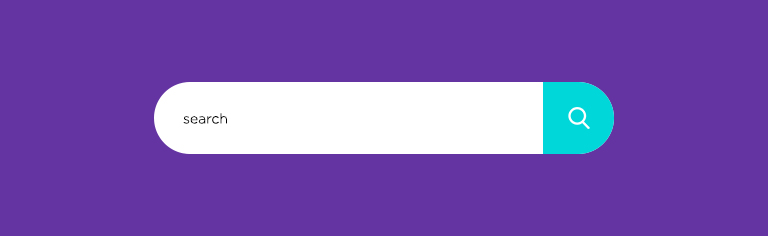
When you are designing your search box, keep the familiar magnifying glass icon. This helps visitors to easily locate the search box. When viewers are trying to find some information or a product which they don’t find easily, you really don’t want them to put more efforts in looking for a search box. While looking for a search bar, natural instincts force them to look for a magnifying glass, as it is a universal search icon. Continue with the same icon because a majority of visitors, if not all, are familiar with the icon.

Magnifying Glass Icon

2. Search Bar Must Be Prominent

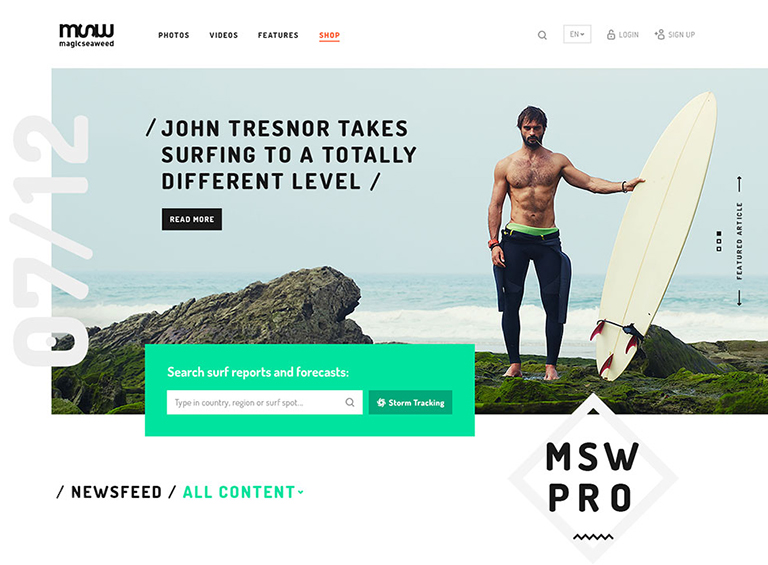
While displaying the search bar, ensure that the design is prominent so that it can be easily found. When answers are hard to find, your search bar needs to be available as a quick and easy solution. Not just the icon, but the text field should also be easily visible so that your viewers know where to ask their question. Placement of the search bar has been a matter of discussion among designers since ages. The truth of the matter is that it should be placed where the user expects it to be; which is either at upper right-hand corner or upper center section of the page. Top corners of the page are often where people expect it to be, as a lot of popular websites place it over there.

mswpro

courtesy:mswpro

3. A Submit Button Is Must

The search button on your website is like Google. The difference is that Google searches the query across the web, whereas search box looks for answers from your website. As a result, it should be reasonable for viewers to expect that by typing in a question, they have to submit their query by clicking on the ‘enter’ button. However, it does help to have a large submit button which shows your viewers what to do. It helps to make this area large so that viewers don’t have to click and point the mouse or tap a narrow area on a phone or tablet. Many viewers will click on ‘enter’ instead of submit. When designing your website, you can test that the enter button will work in order to produce the correct results.

4. Search Box On Every Page

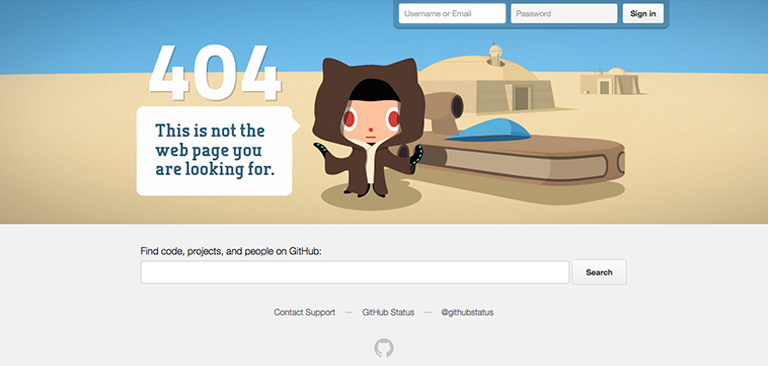
Placing a search box on every page increases the efficiency of your website. Visitors may get stuck on any of your web pages and at that time can easily navigate their way using the search option. They might reach to a web page from the home page using the search option, and they may even be happy with the content they find there, but they may wish to explore more. If there’s no search box on that web page, they will again get lost. Search bar should also be included on dead end links such as any 404 pages, so that your viewers will be able to find information they are looking for and return to your main site should they need to.

github

courtesy:github

5. Long Search Field

When your viewers type a query into your search field, you must have enough space there so that they can see what they are doing. This way, they will be able to review or edit their query. Ideally, your text box should allow 27 characters or more because most queries will be contained in this amount of space. Set your width using ems, or the size of one letter m. This will enable you to judge your space effectively. In order to save space, an expanding search field, which grows as the user types in a question, should be used.

courtesy:Cnet

6. Auto-Suggestions Enabled

Autosuggestion is a blessing for visitors who are typing their queries into the search box. It prompts them to quickly reach to what they are looking for. Framing queries is a tricky business and not everyone is good at it. If visitors don’t find any relevant answers to their query, it’s very hard for them to rephrase the question without being prompted. By using the auto-suggestion box, users are able to search for content effectively.

courtesy:Cnet

Conclusion

A search bar offers your viewers the opportunity to navigate your site quickly and efficiently in order to find the content they are searching for. This aids user experience and provide them with some sense of control. It should be bold and easy to find, so that the user is never confused about how to find information. User experience is a vital part of web designing and plays a pivotal role in the success of your website.  Our experts  are ready to guide you on how to design a UX rich website.

Categories
UX

5 UX Rules Every Startup Must Recognize

Anyone who’s familiar with best practices in design fields knows how important it is to commit time and resources to UX development. But tech startups tend to spring up almost from nowhere, boosted by programmers who may not have a great understanding of the importance of user experience. The result – UX designs that confuse, infuriate, and ultimately leads to tons of questions. Here are 5 UX rules that are the most important for tech startups to recognize as early as possible in the development process.

Rule 1: Let Go the Vanity Designs

Your back-end tech ideas may be wholly revolutionary, but it doesn’t mean that any design you come up with is automatically fit for purpose. The only opinions that really matter when it comes to UX are those of the users, and they don’t usually leave much room for vanity design. Every designer thinks he knows a lot. But don’t try to reinvent the wheel. Unless you have an incredibly compelling justification, adhere to existing UX standards, and give your users something recognizable instead of something revolutionary (familiarity beats novelty). Being creative is fun bit don’t try and over do it.

Rule 2: User Psychology is Key

Content is king is the common belief, but that isn’t really true. User psychology is king. Content is just one way of affecting it, and UX is another. In fact, top UX designers are masters of psychology, carefully studying how and why users take particular actions.

Startups can easily get stuck in an infinity loop when it comes to psychology, imagining one type of end user and getting trapped by their perspective. People are more complex than that. Users will vary in countless ways. You can’t account for them all, but you can do a good deal of research and come up with general personas that cover most of your target audience (try using a guide on how to create personas).

Rule 3: KISS (Keep It Simple, Stupid)

The best user experiences are streamlined, trimmed down for speed and efficiency. You might think this simply calls for compressing images, using clear language, and avoiding unnecessary data entry, but there’s almost always more to be done.

When prototyping a UX, you should cast an eye over every single element; every image, CTA, paragraph, button, or piece of styling and after careful review, ask “Is this really necessary?”. If you get rid of it, does the end user lose anything of significance? Will they find it harder to achieve their goal, or like the site any less? If an element doesn’t justify its presence, scrap it. Smooth out the friction. A simple design is easier to demonstrate, understand, run, and maintain.

Rule 4: Maintain Consistency

Some layouts can be extremely confusing, with variable design elements and unclear contextual clues. That’s why making your UX design consistent across every aspect of the project is essential. Think about basic visual elements like icons. We don’t really pay that much attention to them when they’re used correctly, but they glaringly stand out when they’re used poorly.

You can get a solid idea of what you can and can’t play within a layout by taking one look at the themes. Change the colors? No problem. Change the font? Also fine. Alter the icons or the basic navigation? Not the best idea. Get it slightly wrong and users will have no idea what’s happening. You don’t want to make your users think.

Rule 5: Get Rid Of Lorem Ipsum

At some point in UX design history, someone decided that creating layouts and populating them with fake text (usually Lorem Ipsum) was a good idea. It really isn’t, and the sooner you get out of the habit of using empty copy, the better off you’ll be. At the very least, this is because text is a core component of UX. It steers people away from certain areas and towards others, and has a knock-on effect on how the rest of the interface is perceived. Iterating upon copy is just as important as iterating upon any other UX element.

UX can seem like a distant concern for a tech startup focusing on functionality and scaling, but where there’s software of any kind, there’s a demand for great UX that cannot be overlooked talk to our UX experts and discuss your requirements.

Categories
UX Web Design

How To Enhance The UX Design of A Hotel Website?

User experience is an essential element of any website. However, the hospitality industry is one such industry wherein the importance of user experience grows multiple folds right from the word GO! The heart of the entire hospitality industry goes in providing an amazing experience to its customers, especially when it comes to hotels. As a hotel owner, you wish to provide a memorable stay and experience to the guests and also offer them amazing user experience right from the first point of contact, which is your hotel website. So, here are 5 tips to enhance the UX design of your hotel website and create unforgettable experiences.

1. Optimization Of The Booking Flow To Boost Conversions

Conversion is the key. No matter how divine your website looks, or how delicious your food tastes, if the conversion ratio of your website is low, it all goes down the drain. To ensure that your conversion ratio is in place, you must streamline the booking process on your website.
Focus more on usability rather than the aesthetics of the booking window. Always place the booking window at a clutter-free and visible spot on the website.
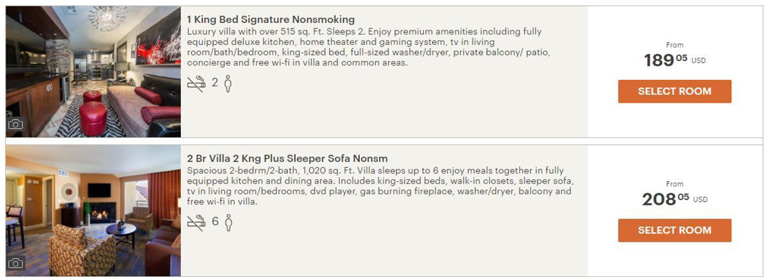
Clearly highlight the room types and rate differences between the rooms. Also, support it through relevant high-quality images. This helps the user to quickly make an informed decision.
Gather only vital information upon checkout and refrain from asking unnecessary questions. Make sure that you provide a clear summary of the booking so that the customer can review and confirm the booking.

Source: Holiday Inn

2. Design For Mobile First

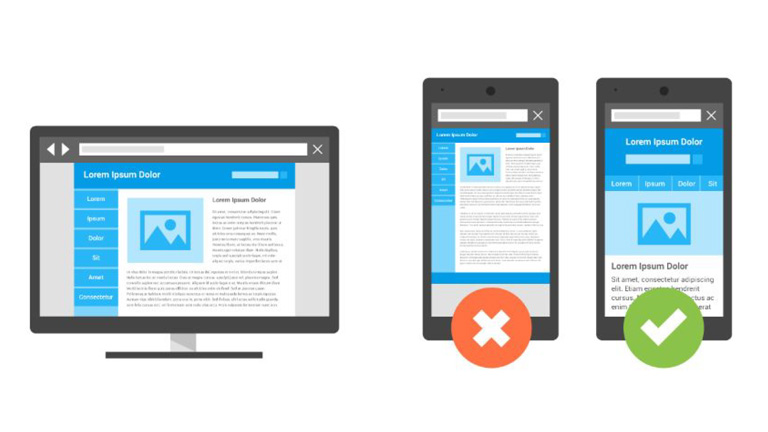
This needs no detailed explanation. Majority of the people these days access the internet through their smartphones and thus it’s pivotal that you design your hotel website for the mobile screens first. Moreover, the importance of mobile first design grows more as the users predominantly make bookings while on the go. There’s a sense of urgency in these cases, which means the design should be focused towards usability rather than functionality. In case you’re not able to provide the complete functionality of the website to mobile users, at least provide a link to your full website to them.

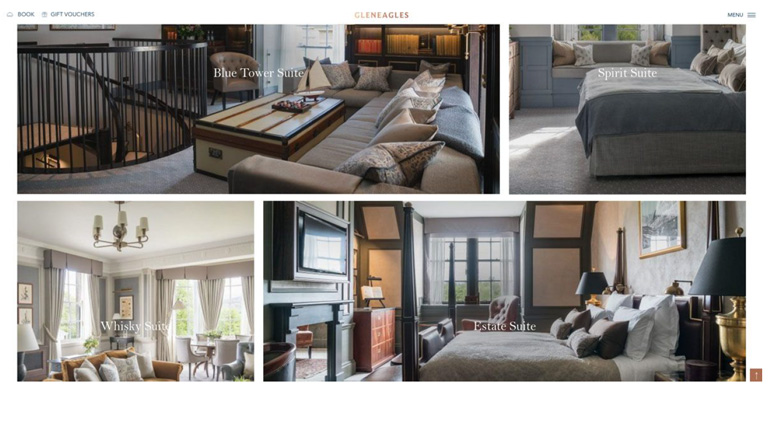
3. Make Your Website Visually Compelling

Users crave for high- resolution photographs of the hotel property. They want to take a virtual tour of the entire hotel through the images. So provide them high-quality photographs of every nook and corner including the rooms, bathrooms, lobby, view from the balcony, interiors, exteriors, swimming pool, banquet and all other facilities available in the hotel. That said, ensure that your images are optimized, else the loading time of your website will skyrocket, only to push up the bounce rate and drag down your business.

Source: Gleneagles.com

4. Offer Delightful Customer Experience Through The Website

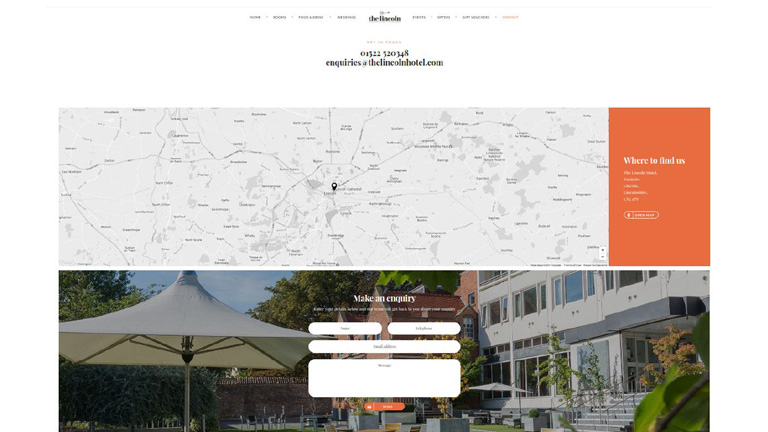
User experience and customer experience are very closely connected and go hand in hand. Your website user experience can heavily influence the overall customer experience of your guests. So, it’s best to provide a delightful customer experience from the very first touchpoint which is your website. Online travel booking websites like Booking.com, Expedia etc. can never provide a personalized guest service, which is an advantage for you as a hotel owner.
Ensure that there are multiple ways for a customer to get in touch with your hotel administration, straight from your website. A landline phone number, skype, contact form for reservation related inquiries and special requests, as well as a live chat are must-haves on your website.
Offer special add-on services, which are not available on any other sales channel. It can be a complimentary welcome drink, a bottle of wine or perhaps a special discount. This will make the user feel the difference when booking with a hotel directly and will ensure repeat purchase directly from the hotel website.

Source:thelincolnhotel.com

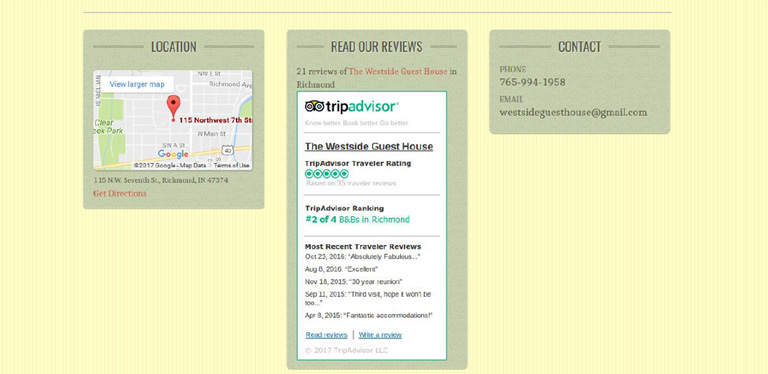
5. Add Reviews From A Trusted Source

A study showed that almost 77% of travellers do reference review before booking an accommodation. Social proof is one of the most important factors to influence a buyer’s decision. In order to enhance your website’s credibility and provide social proof for your guests, showcase reviews from a trusted and well-known source like Tripadvisor. While adding a Tripadvisor review widget might not add an aesthetic appeal to your website, it surely is much more convincing than your own website testimonials.

Source: West Side Guest House

Developing a hotel website which is great in terms of both UX and marketing is a daunting task, and it might take more than one go to achieve the feat. But, these tips really come in handy during the design process and smoothens the path towards the ultimate goal. Talk to our UX experts, and learn more on how you can revamp your hotel website.

Categories
Web Design

5 Valuable Tips On Effective And Persuasive Web Design

The ultimate goal of any website is to draw user’s attention and to influence his behavior on the website through web design. While this is a well-known fact, most of the website designers end up focusing more on the visually appealing factors and sideline the critical aspects of website designing. We have collected a few important tips which will help you focus on designing influential and effective websites. Take a look!

1. Keep A Check On The Text Length

The optimal length is 100 characters per line. However, for a likable reading experience make it between 45 and 72 characters. This is because people prefer reading shorter lines. To be more precise, people don’t really read on the web but they only browse through the text. Keeping an optimal length of text will ensure that the users don’t hurry through the text but actually read it.

2. Avoid Providing Unnecessary Distractions To Users

You may think that humans can multitask by keeping the same level of concentration on each task, you are probably not correct. Users don’t really do multitasking, they do switch-tasking. When a user is switch tasking he cannot properly remember or pay attention to everything.

Make sure that you don’t let your customers focus on 3 different things at a time. Arrange your sequence of information, the layout of your images, and copy carefully without unnecessary distractions. This is especially important for your vital pages like the sign-up page and the main product page.

3. Pair Your Colors Well

Never try to be too flashy and experimenting with colors. When it comes to selecting the color scheme of a website, the classic color schemes are the best. I have seen designer pairing Red & Green, or Red and Blue. These pairings are too hard on eyes.

They create an optical illusion of colors jumping out, making it very tiring for the user’s eyes to look at. Go with pastel backgrounds while choosing colors for your website. Don’t go too strong on the colors. A dark font on a light background is highly recommendable.

4. Break Down The Content For Easy Reading

Despite all the new technology available in the world, reading text online is still a tedious job and can cause fatigue. For the simple fact that our eyes are not meant to read text online. So for an easy reading experience break down your copy into bullet points, shorter paragraphs, and categories.

Use of images is also a great way to ensure better user experience. Also, it’s not advisable to be too experimental with the shapes and fonts of the text. Use clear and readable fonts. Shy away from skinny fonts and use big and round ones. The best size is 14 or 16.

5. Always Remember The 3 To 4 Rule

3 is an important number. Humans can remember 3-4 things at a time and that too for about 20 seconds before they disappear into an unexplored world. But, this doesn’t mean that you can only give 3-4 options to your customers. Simply stack your information into groups of 3s and 4s.

This is especially important for your navigation bar. By giving more than 3 to 4 options to your users, you will make it difficult for them to choose or even take any action. Also, avoid keeping too many tabs and categorize all the information under 3-4 tabs.

Conclusion

These simple, effective and useful considerations will make a huge difference in how your customers will experience your website. These tips will also boost your chances of selling being a content, product or idea. Talk to our design experts and learn more such tricks on designing.

Categories
Technology Web Design

These 5 Tips To Design Ecommerce Product Pages Are Absolutely Gold

The whole and sole purpose of any eCommerce website is to achieve higher conversion rate and thus generate a bigger revenue. Therefore, they focus extensively on the checkout process for users. Right from the time they add a product to the cart, to the time they complete the purchase. However, it’s not only the checkout process that is important. The product pages also hold equal importance. The product pages must be designed in a manner that customers get all the information that they seek in the most convenient way. Here are a few tips to enhance user experience on Ecommerce product pages.

1. Clear Mention Of Price And Features

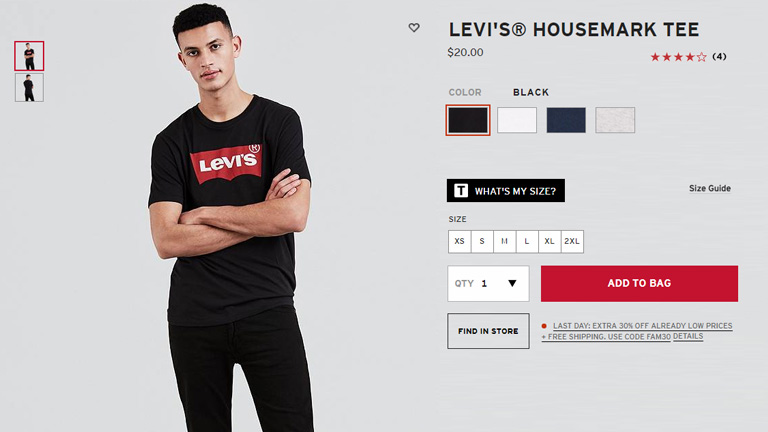
The first thing that customers look on a product page is the price. Display the price as early as possible. Display it at the very top of the page and to the side of the product title as well. It’s better that you display the overall price of the product including all the applicable taxes and also mention the shipping charges if any. The prominent features like different colors or sizes should also be clearly mentioned. If the price of the product changes with any color, pattern or size, the change should reflect right when the variant is selected. The aim is to be as transparent as possible while dealing with the price.

Price And Features

Image Credit: levis.com

2. Display Sellable Images

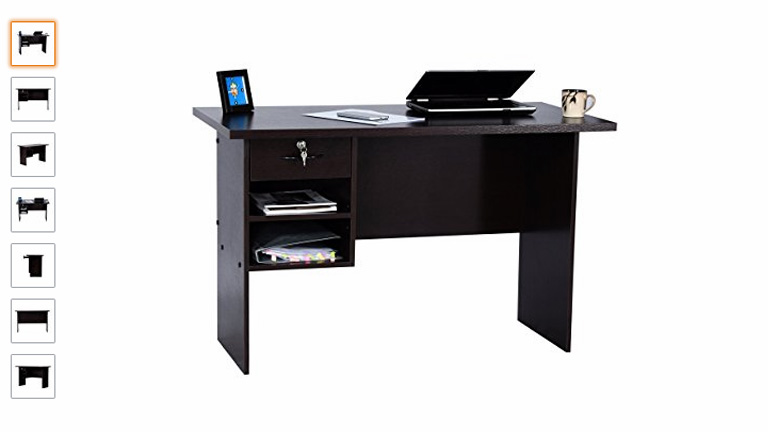
Images play a huge role in increasing the sale of any product. It’s a proven fact that products with great images sell faster and more than other products. The number of images to display is however arguable. 10 images or just 1 great image. Both can create the desired impact. The idea is to give customers a digital taste of what the product actually looks like. Features like ‘Click To Zoom’ and ‘Thumbnail Galleries’ provide added advantage.

Display Sellable Images

Image Credit: amazon.com

3. Product Description At A Glance

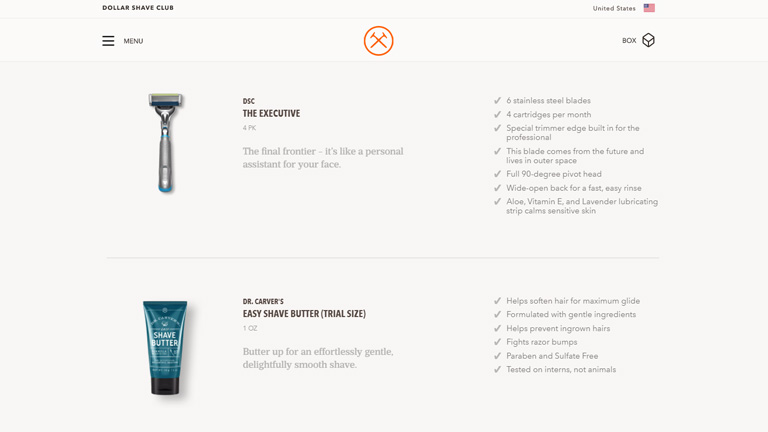
People over the web don’t really read everything written on the web pages and simply browse through them. That’s why it’s not a good idea to stack up long features list in different sections. Rather, you should present prominent features of the product in a skimmable format right beneath or beside the main product. Keep the list short, segmented in pointers, with a crisp one-line description. Make the heading ‘features’ eye-catching by enlarging its font and tweaking the font style. Trust us, you will grab more eyeballs.

Product Description

Image Credit: dollarshaveclub.com

4. Always Display Customer Reviews

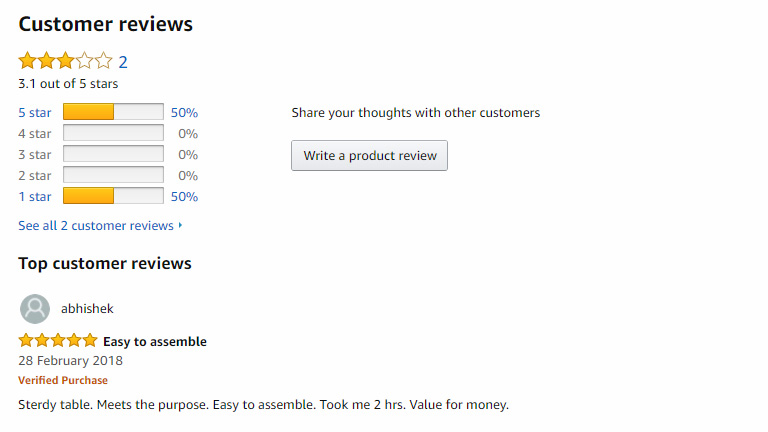
Customer reviews are a great way of building trust among your ‘to be’ customers through testimonies of your existing customers. These reviews help potential buyers in making a wise choice and a lot of their doubts are cleared through them. It’s not necessary to display the full reviews right at the top. They can be displayed under a separate section preferably at the bottom of the page. However, overall average rating through star system must be displayed at the top of the page.

Display Customer Reviews

Image Credit: amazon.com

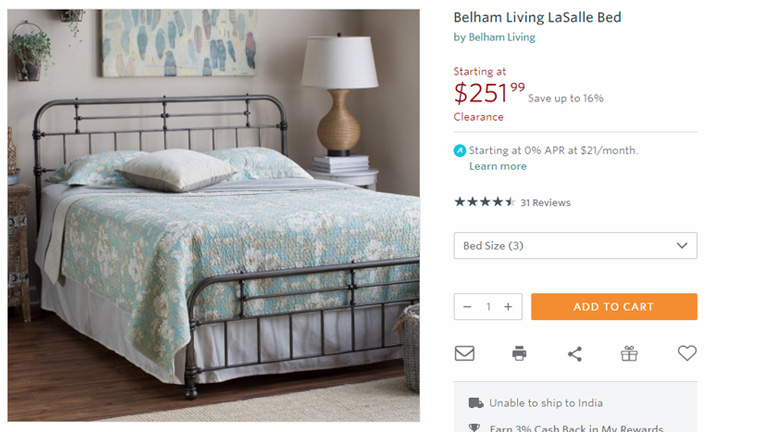
5. A Clear And Easily Accessible ‘Add To Cart’ Button

Once the customer has finally decided to buy a product, then begins the ultimate process of checkout. This process is generally guided by a CTA button (Add To Cart in this case). The CTA button must be very clear, easily accessible, and available at any given point in time. The button must be designed to be distinct by use of strong colors, different font style, and button text. It’s advisable to place it at the top of the product page.

Accessible Add To Cart Button

Image Credit: Hayneedle.com

Conclusion

The Ecommerce space is huge and is filled with tons of products. Every product is different and may demand a different design concept. Nonetheless, these basic UX concepts can fit for almost every product page on a broader level. Apply the aforementioned tips along with little tweaks of your own and you will get the results. Have a little chat with our design experts and tell them your design requirements.